The to-do list for women who get it done.
Type your plans the way you’d say them. Taskly sorts out the dates, repeats and priorities, and a coach in your corner keeps you going.
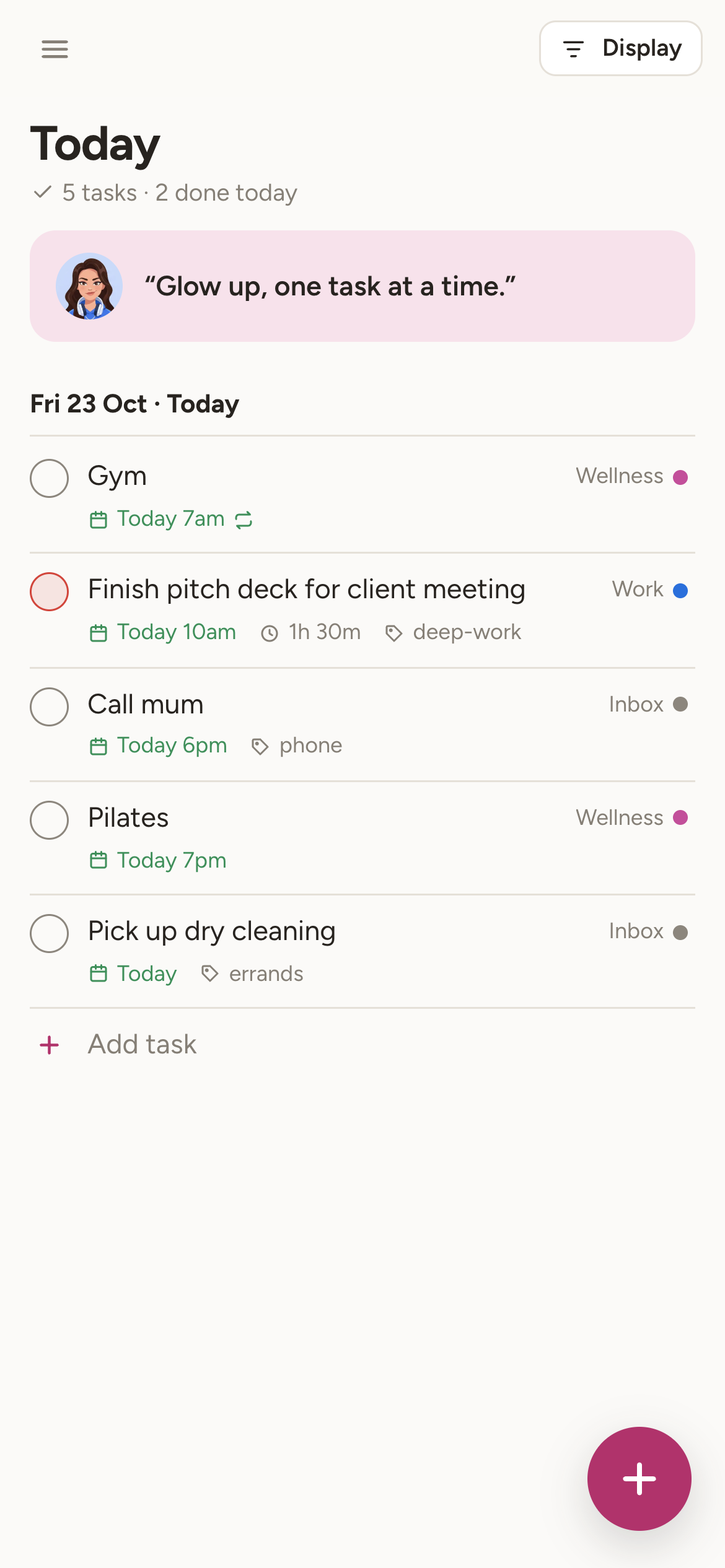
Your whole day, at a glance
Today shows what’s due, what slipped, and your calendar events in one calm list. Durations, labels and priorities stay visible without getting in the way.
- Overdue tasks gathered in one place, rescheduled in a tap
- Recurring tasks that roll forward when you tick them off
- Subtasks, sections, board view and saved filters

A coach in your corner
She keeps an eye on your daily goal. She cheers when you hit it, nudges you kindly when things slip, and greets you with a new line every morning.
 Planning the day
 On a roll
 Goal reached
 A few slipped
Prefer a plain list? Switch the coach off in Settings.

Works with what you already use
- Google Calendar
- See your events next to your tasks. Dated tasks appear on a “Taskly” calendar, and moving one there moves the task too.
- Claude
- Connect Taskly to Claude, then just ask: “add my dentist appointment for Friday” or “what’s on my plate this week?”
- Any calendar app
- A private subscription link shows your tasks in Apple Calendar, Outlook or Google Calendar.
- Offline
- No signal on the train? Keep adding and ticking off. Everything syncs when you’re back online.
On every screen you own
- WebAvailable now in any browser, and installable on your home screen.Open Taskly
- iPhoneComing soon to the App Store.
- AndroidComing soon to Google Play.
Free during early access
Everything is included while Taskly is in early access: unlimited tasks and projects, recurring tasks, filters, Google Calendar, Claude and the coach. A paid Pro plan will come later; you’ll hear about it before anything changes.
Open TasklyEarly access is by invitation for now. Ask for an invite at hello@taskly.business.
Questions
Is Taskly only for women?
Taskly is designed with women in mind, from the coach to the daily lines. Everyone is welcome, and the coach can be switched off.
Where is my data kept, and who can see it?
Your tasks are stored on Cloudflare’s servers in the European Union. Only you can see them. There are no ads and no tracking, and we never sell data. Read the privacy policy.
Can I take my tasks with me?
Yes. Settings → Backup exports everything as a file at any time.
How do I delete my account?
Settings → Account → Delete account. Your tasks, projects and connections are deleted straight away.
What does the Claude connection do?
It lets Claude read and update your tasks when you ask it to, using a private link you create in Settings → Claude. You can revoke the link at any time.
Does it work offline?
Yes. Taskly keeps a copy on your device and syncs your changes when you reconnect.